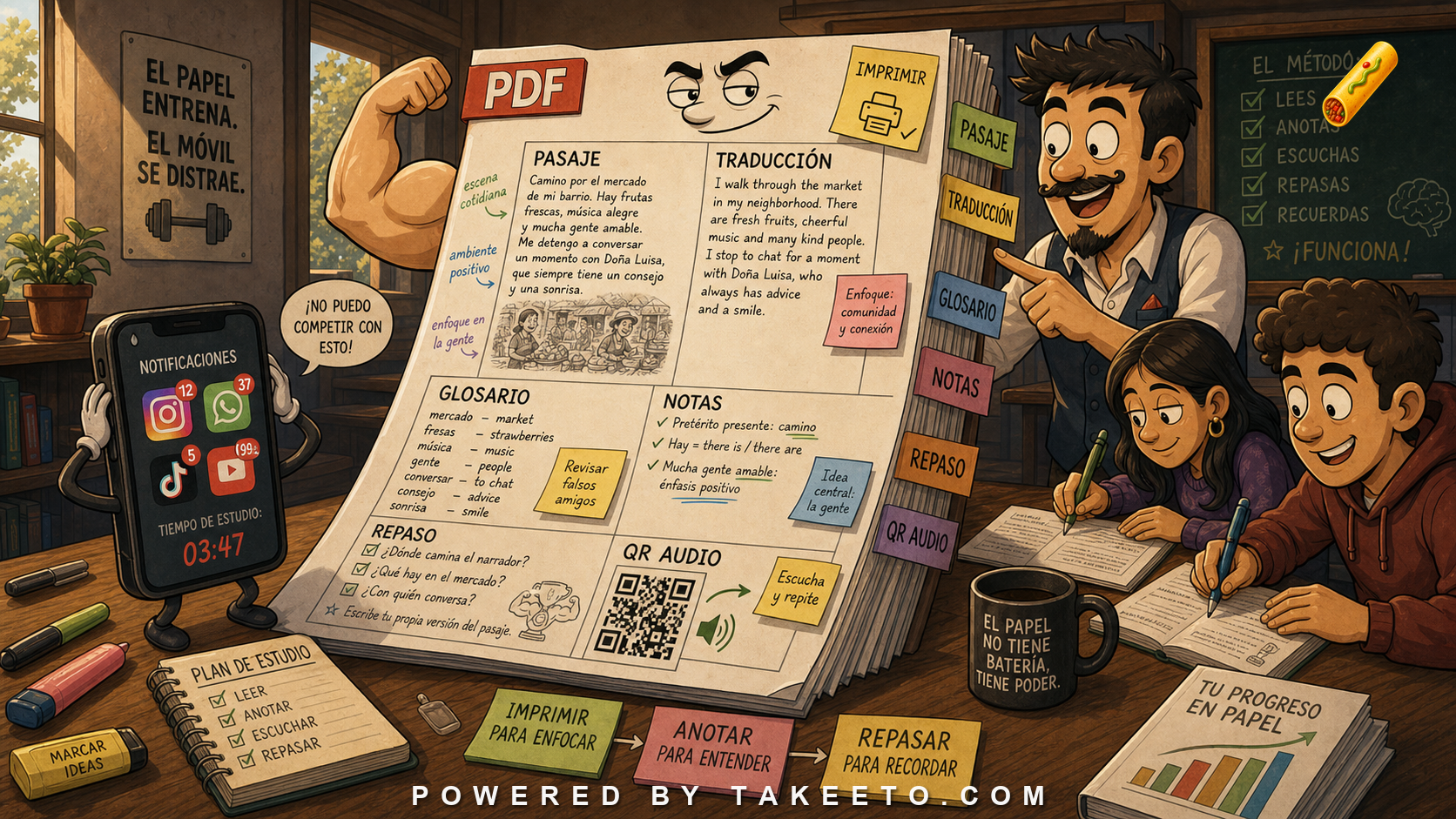
Phone learning is convenient, but paper changes attention
A phone is excellent for short reviews, audio playback, flashcards, notifications, and quick translation checks. It is not always the best surface for slow reading, annotation, or deep comparison.
A printable Spanish PDF gives the learner a different mode:
- margin notes,
- underlining,
- handwriting,
- rereading without notifications,
- classroom distribution,
- offline study,
- side-by-side translation,
- visible progress through a packet.
The key principle:
Paper support does not replace app learning; it deepens the parts of learning that need slower attention.
Annotation is a learning act
When learners mark a passage, they make decisions:
I understand this.
I need to review this.
This verb form is new.
This connector matters.
This word appeared before.
This sentence is worth rereading.
Handwriting can slow the learner down in a useful way. A phone tap is fast. A margin note is deliberate.
A good PDF invites annotation with space:
- line spacing wide enough for marks,
- margins for notes,
- numbered sentences,
- glossary references,
- review checklist.
What a strong Spanish PDF should contain
A deck passage PDF should not be a random export. It should be a study artifact.
Core sections:
- Spanish passage with focus/review marking.
- English translation aligned by paragraph or sentence.
- Glossary with focus items, review items, and notes.
- Grammar notes only where needed.
- Audio references through QR code or short link.
- Practice questions for comprehension and retrieval.
- Note space for learner annotations.
- Review plan telling the learner what to do next in the app.
This makes the PDF part of the curriculum, not a souvenir.
Translation layout matters
Side-by-side translation can help comparison, but it may tempt learners to read only English. A better design depends on level.
Options:
- Spanish first, translation after.
- Sentence-numbered Spanish and English.
- Translation folded into a second page.
- Glossary before translation for challenge.
- No translation on first print page for advanced learners.
The layout should reflect the study goal. Beginner PDFs may need more support. Advanced PDFs can push Spanish-first reading.
QR codes and audio references
A PDF can connect paper to audio:
Scan to hear slow audio.
Scan to hear natural audio.
Open item audio in the app.
QR codes should not be clutter. They should be clearly labeled and stable.
A learner should know:
- which audio is slow,
- which audio is natural,
- whether the voice has a dialect label,
- whether the link requires internet,
- whether the audio is downloadable.
Branding should not overwhelm study
A PDF can include a logo, URL, app link, and product identity. That is reasonable. But if branding dominates the page, the educational artifact becomes an advertisement.
Good branding:
- small header or footer,
- clear source identification,
- version number,
- app link at the end,
- clean typography.
Bad branding:
- large promotional blocks between study sections,
- heavy colors that hurt print readability,
- QR codes everywhere,
- distracting screenshots,
- vague claims.
Serious learners respect materials that respect their time.
Print study should feed app review
The PDF should tell learners what to do after paper study:
- Read the Spanish passage.
- Mark unknown items.
- Check glossary.
- Listen to slow audio.
- Read aloud.
- Complete app flashcards.
- Take the post-session exam.
- Revisit missed items tomorrow.
Paper and app should form one loop.
Paper also supports teacher and tutor workflows
Printable packets are useful for self-study, but they also support classrooms, tutoring, and conversation groups. A teacher can ask students to underline every subjunctive form, circle administrative nouns, mark unknown collocations, or rewrite a paragraph in plainer Spanish. Those activities are awkward on a small phone screen and easy on paper.
A tutor can write corrections directly beside the sentence. A learner can bring the same packet back next week with notes and questions. A group can discuss line 12 without everyone scrolling to a different place. These are practical advantages, not nostalgia.
For Takeeto-style materials, PDFs can also create continuity between app sessions and human instruction. The app handles spaced retrieval and audio. The printed packet supports annotation, discussion, and slower synthesis. The best curriculum does not force one medium to do every job.
Example bank walkthrough
passage
The Spanish reading text.
Learner action: read and annotate before card review.
translation
English support.
Learner action: use it to verify meaning, then return to Spanish.
glossary
Definitions and notes.
Learner action: mark which items need review.
notes
Blank space for learner thinking.
Learner action: write questions, patterns, and examples.
QR code
Bridge from paper to audio/app.
Learner action: scan for audio or review.
audio
Listening support.
Learner action: listen after reading, then again without text.
review
Return to retrieval practice.
Learner action: do not let PDF study remain passive.
Physical format.
Learner action: use it when deep reading needs less screen friction.
Versioning and stale PDFs
Printable PDFs create a maintenance problem. If the app deck changes but the PDF does not, learners may study stale content.
A serious PDF should include:
- deck identifier,
- version number,
- publication date,
- source passage title,
- audio link version,
- glossary version,
- correction note if updated.
If solicitar is removed from a deck but remains highlighted in the PDF, the curriculum has an orphaned artifact. Versioning is not bureaucratic fussiness. It protects trust. A learner should know whether the printed packet matches the current app content.
Remediation notes: printable PDFs should be study artifacts, not screenshots of the app
The repair for printable PDFs is to make their role explicit. Paper support is not nostalgia. It enables annotation, margin notes, slow rereading, classroom use, tutoring, offline review, and learner reflection. But a PDF should not merely duplicate the app screen. It should be designed as a printable study artifact.
A strong deck PDF needs stable structure: title, deck number, Spanish passage, aligned English translation, glossary, grammar notes, audio references, space for notes, and a small review checklist. If the PDF includes QR codes or links, they should be versioned and durable. A learner should not print a packet only to find that the audio link breaks two months later.
The article should add a versioning repair. Curriculum changes create stale PDFs. If a passage changes, the translation, glossary, highlights, audio references, examples, and exam links may also need updates. A PDF should carry a version date or deck version. Teachers and learners need to know whether they are using the current artifact.
Print readability is not the same as screen readability. Fonts, line height, margins, page breaks, grayscale legibility, and room for handwritten notes matter. Highlight colors that look clear on a phone may print badly. QR codes need enough contrast and size. Long glossaries should not split in a way that hides the word from its explanation.
Privacy and sharing also matter. If PDFs include learner progress, names, notes, or personal review data, they should not be casually shareable. If the PDF is meant for public sharing, keep it curriculum-based, not user-specific.
Production target: treat the PDF as a companion to retrieval, not a replacement. The paper packet supports slow reading and annotation; the app handles scheduling, audio playback, feedback, and exams. A serious product lets each medium do what it does best.
Suggested interactive module: deck-passage PDF layout specification
A strong tool for this article would preview printable formats.
Suggested functions:
- Layout templates: beginner, intermediate, advanced.
- Highlight options: focus/review items in print-safe style.
- Glossary placement: side, bottom, or separate page.
- Translation mode: side-by-side, paragraph-after, hidden page.
- QR generator: slow audio, natural audio, app deck.
- Note-space control: margins and line spacing.
- Versioning footer: deck ID, date, curriculum version.
- Print check: black-and-white readability.
Final rule
Phone learning needs paper support because not all learning should happen at phone speed.
A strong Spanish PDF gives passages, translations, glossaries, notes, audio links, and a return path to app review. Paper slows attention; the app schedules retrieval. Together they make study sturdier.